
Managed ERP · Odoo 18 Community
zynAIR is Odoo, configured and operated by ZYNTEIRO.
Not a fork, not a rebadge, not a platform of our own. Odoo 18 Community — set up against your processes, hosted, upgraded, extended and run by our team, with the rough edges already sanded off.
In short
What is zynAIR?
zynAIR is Odoo 18 Community Edition, configured and operated by ZYNTEIRO TECHNOLOGY SDN. BHD.. It is a managed ERP service, not a separate product and not a fork of Odoo. Clients get standard Odoo — sales, inventory, manufacturing, accounting, purchasing, people — implemented against their processes, hosted and upgraded by us, plus modules we have written to fix specific Odoo shortcomings in list usability, report rendering, checkout performance and e-Invoice operation. There is no per-user licence fee. Casing is fixed: lowercase “zyn”, uppercase “AIR”.
Start here
What an ERP is, without the brochure.
If you already know, skip to the module grid. If you have been sold one before and are not sure what it was, this section is the honest version.
One record, read by everyone
An ERP is not software that does accounting, or stock, or sales. It is the decision that those things stop being separate records. A sales order, the stock it reserves, the purchase it triggers and the invoice it becomes are one object seen from four angles.
- Sales sees committed stock, not a guess
- Purchasing sees demand, not a request by email
- Finance sees the ledger move as the goods move
What it actually replaces
For most Malaysian SMEs the incumbent system is not a competitor’s ERP. It is a set of spreadsheets, an accounting package, a WhatsApp group and one person who knows how it all fits together.
- The stock spreadsheet that is right on Mondays
- Re-typing an order into three systems
- A month-end that takes nine days
- The key person who cannot take leave
What it costs you that nobody mentions
An ERP makes your process explicit. Everything informal becomes a decision somebody has to make and write down — and that is the real work, not the software.
- Every exception becomes a rule or is refused
- Master data has to be correct, permanently
- Somebody senior has to decide things
When you are not ready
Said plainly, because starting too early is the most expensive way to buy one. If nobody internally can commit a day a week for three months, wait — and we will tell you if we think that is your situation.
- No single decision-maker for process questions
- Master data nobody is willing to clean
- A go-live date set by a board, not by readiness
Why managed by us · 01
We do the deciding-support, not just the configuring.
Every implementation stalls in the same place: a question about your own process that nobody has been made to answer. A partner who only configures waits for you. We map the process, put the open questions in a list with a name and a date against each, and chase them — because the schedule is decided by that list, not by the software.
- A written process map you keep whether or not you continue with us
- Open decisions tracked as a register, with owners
- We will tell you when you are not ready, before you pay for a go-live
The platform
What Odoo is, and what it is not.
Odoo is the ERP we implement, and it is a genuinely good choice for most companies in the range we work with. It is also oversold, so here is the assessment we would give a friend.
What Odoo is good at
A single, coherent, open-source application covering the whole operation, with a module for nearly everything and no per-user licence in the Community edition.
- Genuinely integrated — one datastore, one object model
- Open source: the code is inspectable and extensible
- A large module ecosystem, including OCA
- Malaysian localisation and MyInvois support
- Extends cleanly without forking core
What Odoo is not good at
Stated because you will find out anyway, and it is better to find out from us in week one than from your team in month six.
- Out-of-the-box usability at volume — lists get uncomfortable past a few dozen rows
- Reporting beyond the standard views often needs building
- Some edge cases are genuinely buggy until someone fixes them
- Upgrades are real work if anyone has forked a theme
- “Everything is configurable” is true and is not the same as “configured”
Sales
Quotation to invoice in one flow, with the pipeline in front of it.
- CRM pipeline
- Quotation templates and terms
- Customer portal
- Margin per line
Inventory
Multi-warehouse stock that matches the count on the floor.
- Barcode receipts and picking
- FIFO / FEFO
- Lot and serial genealogy
- Replenishment rules
Manufacturing
Bills of material, work orders and real shop-floor capacity.
- Multi-level BOMs
- Work-centre routing
- Actual production time
- Quality checks
Accounting
Malaysian statutory books your auditor accepts without a reconciliation project.
- Localised chart of accounts
- Bank reconciliation
- SST handling
- MyInvois e-Invoice
Purchasing
Replenishment a planner reviews rather than a spreadsheet nobody trusts.
- Purchase requests and approval
- RFQ to purchase order
- Vendor price lists
- Incoming inspection
People
Contracts, attendance and payroll inputs in one record per employee.
- Attendance and leave
- Appraisals
- Payroll hand-off
- Biometric attendance feed
Every module above is standard Odoo, configured. Where we have written code it is called out explicitly on this page, because a partner who blurs the line between “Odoo does this” and “we built this” is making it impossible for you to price the alternative.
Why managed by us · 02
Nothing is a fork, so an upgrade is a task rather than a project.
Every line we add is an Odoo module using Odoo’s own patch and asset-bundle mechanisms. Core is never edited and themes are never copied. That single discipline is what decides whether moving from Odoo 18 to 19 costs a week or a quarter — and it is invisible at sign-up, which is precisely why you should ask about it then.
- Extend the asset bundle, never fork the theme
- Anything that patches fragile internals is isolated so it can be uninstalled
- Version ports are our cost, not a change request to you
The interface work
The screen your purchasing clerk stares at for six hours a day.
This is the part of “managed” that no partner puts on a slide, because it is unglamorous and it is where the hours go. Both panes below are live — page through them.
| # | Description | Qty | Unit price |
|---|
Pager at the top only, 200 rows above where you are working. “Add a line” appears under page 1, but the new line lands at the end of the record set — on page 2, out of sight. There is no first or last button, and every row carries a horizontal rule your eye has to cross.
| # | Description | Qty | Unit price |
|---|
Odoo’s top pager kept, and a second one repeated at the bottom where your eye already is. “Add a line” only on the last page, so it adds where you are looking. First and last buttons on both. Clear column rules instead of row rules, and a banded row background you can track across without losing the line.
The same thing, photographed

Under the last row: the add controls, and nothing else. To reach row 201 you scroll 200 rows back up to the only pager on the page.
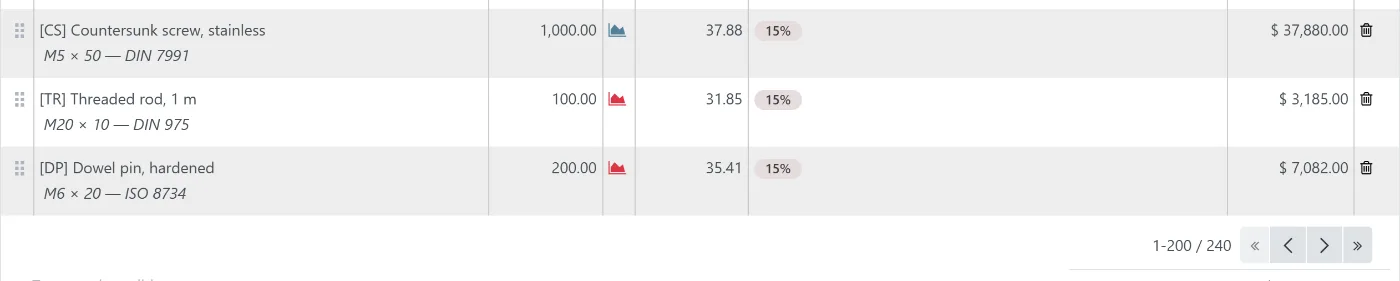
Same rows, same page size. A second pager where your eye already is, with first and last. The add controls are absent because this is not the last page — the line would not land here.
Two Odoo 18 servers on one machine, the same 240-line order in both, the same window size, and the crop taken from the same point in the page on each side. Page size is 200 either way — Odoo’s own setting for this list — so the only difference in the pair is the interface. The customer, the company and every part number are invented.
Tidy rows and columns
Horizontal rules removed, clear vertical column separators added, and alternate rows given a distinctly different background — enough contrast that your eye holds the line across a wide list without a rule under it. Selected and editing rows keep Odoo’s own highlight.
Pager and “Add a line”
A second pager at the bottom, first and last buttons, and “Add a line” only on the last page — where the new line actually lands. When the last page is exactly full, a virtual blank page appears so there is somewhere to add to.
Configurable page limits
Per-page limits as a rule of (model, field, limit) in Settings instead of a view edit, plus a double-click on the drag handle to send a line to another page — because you cannot drag to a page that is not rendered.
Documents that look like yours
Quotation, invoice and delivery layouts built to the company’s own document standard — and for point of sale, per-outlet receipt layouts with per-line typography, editable by the PoS administrator without Settings access.
- Live preview using the real receipt stylesheet
Reporting people actually open
Where the standard views do not answer the question, we build the view — a project cost dashboard, a budget list report, a costing model per customer per product. Built as modules, versioned, not as a spreadsheet export.
- Client-specific dashboards and reports
And the rest, on the same tenant
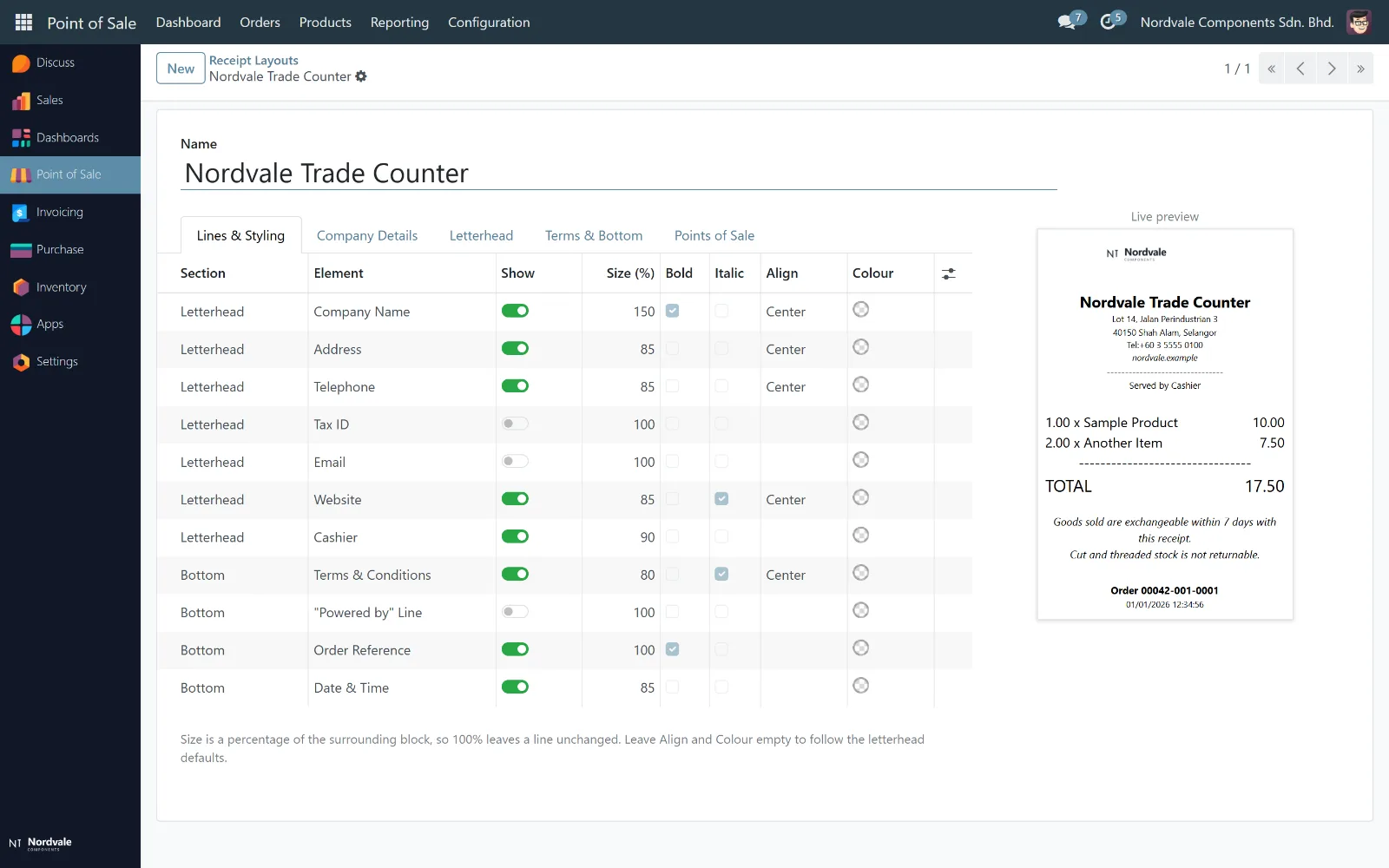
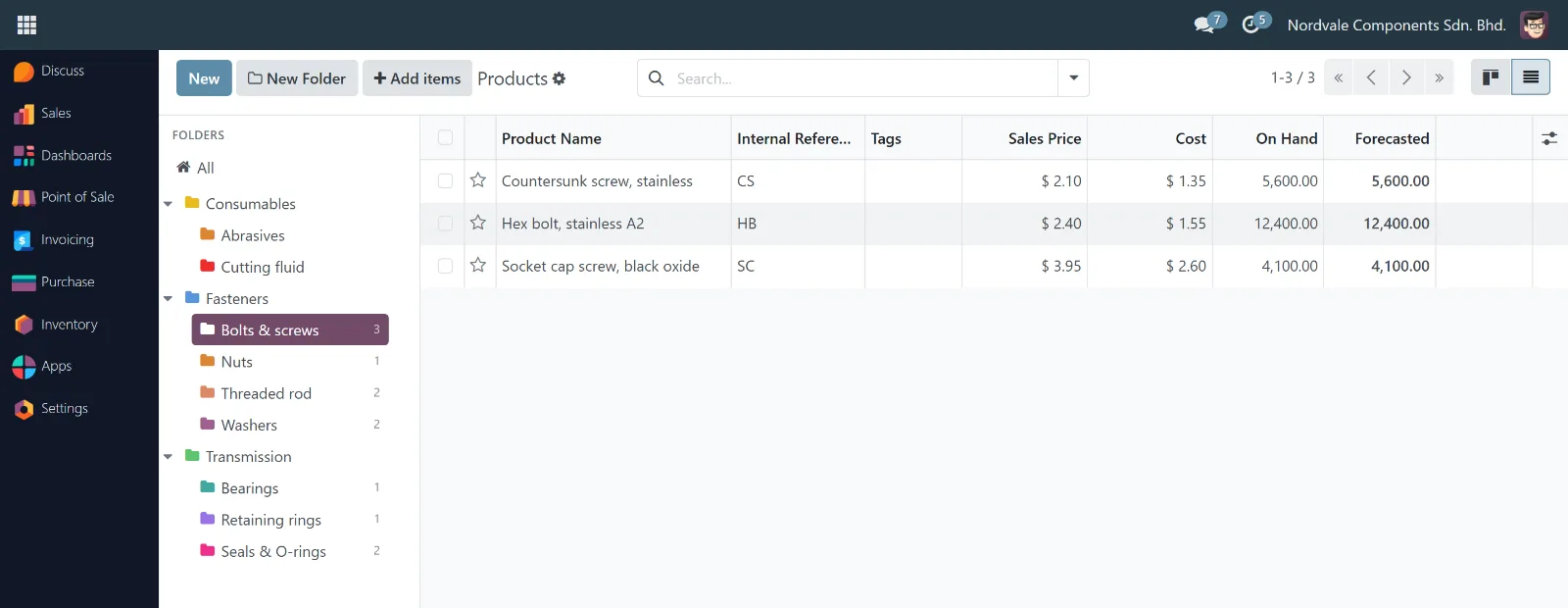

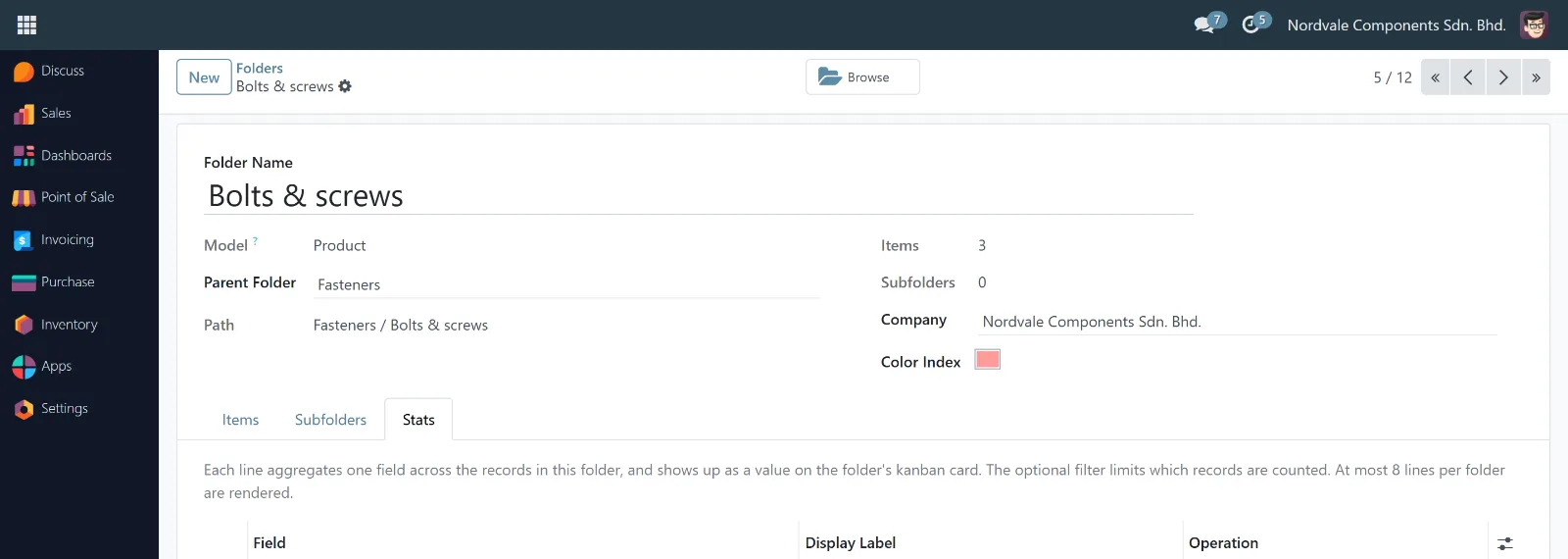

Every change above is code we wrote, running on tenants today. The screenshots are of a demo tenant seeded for the purpose — the company, the customer and every part number in them are invented.
Why managed by us · 03
A defect found on one tenant is fixed for every tenant.
This is the compounding argument for a managed service, and it is the one that is hardest to see from outside. Two real examples, each found on one client, each now installed everywhere it could apply — so most of our clients never experienced them at all.
- A 22-second checkout page — one customer with ~900 saved addresses, thousands of recursive queries, one page.
- A checkout redirect loop — customers whose billing address was not a valid billing address could not proceed and could not choose another. They did not file tickets; they left.
Why managed by us · 04
AI takes the mechanical half. Your people keep every decision that carries consequence.
Two decisions, and neither is about the model. The assistant reaches Odoo through named, typed business intents, and every intent that writes is guarded — posting, sending, confirming and importing are all prepared and then handed to a person to release. That boundary is deliberate, and it is where the value is: the retyping, the reconciling and the copying between systems stop being human work, while the judgement stays with the people accountable for it. And it can run on an existing Claude Code or Codex subscription instead of metered API keys, so the marginal cost of a question is zero and nobody rations their own curiosity.
- Guarded writes: the assistant prepares, a named person releases
- Imports are staged; your team presses Odoo’s own Import button
- You get the source, so your auditor can verify the boundary rather than trust it
- Or fully on-premise on open weights, where nothing may leave the building
Compliance
MyInvois, SST and the books your auditor will accept.
The e-Invoice timetable has moved more than once. The current position is more forgiving than most businesses realise, and the work that actually takes time has nothing to do with software.
| Phase | Annual turnover | In force from | Note |
|---|---|---|---|
| 1 | Above RM100 million | 1 Aug 2024 | In force |
| 2 | RM25m – RM100m | 1 Jan 2025 | In force |
| 3 | RM5m – RM25m | 1 Jul 2025 | In force |
| 4 | RM1m – RM5m | 1 Jan 2026 | Penalty-free relaxation extended to 31 Dec 2027; consolidated monthly permitted, except individual e-Invoices at RM10,000 and above |
| 5 | RM150k – RM500k | — | Cancelled. Exemption threshold raised to RM1m from 1 Jan 2026 |
Position as at August 2026; not tax advice. The work that takes the time is buyer TINs and classification codes on your own master data, not the integration. Full guide, in the order to do it.
Why managed by us · 05
The submission path is ours to operate, including the day it fails.
Submitting an e-Invoice is a network call to someone else’s service, and it will time out at 4:55 pm on the last day of the month. What matters is not the integration — it is that a rejection appears in front of a named person the same day with the reason attached, rather than surfacing in a reconciliation three weeks later. Credentials expire too, and rotating them before they do is our job.
- Rejections are an exception queue somebody owns
- Retries and idempotency, so nothing is submitted twice
- Credential rotation before expiry, not after a failure
Implementation
Four phases, and you know why at every point.
The shape for a single-company Malaysian SME across sales, inventory, purchasing and accounting. Manufacturing, multi-company operation and heavy migration each add to it — and we will tell you by how much, against a written scope, before you sign anything.
Discovery
Process mapping across every department in scope, and the register of open decisions.
- Process map
- Module scope
- Fixed quote
Configuration
Modules configured against the mapped processes, reviewed with you weekly on a real environment.
- Test environment
- Configuration record
Migration
Master data and opening balances moved, then reconciled against your existing books line by line.
- Signed reconciliation
- Cleaned master data
Go-live
Cutover, floor support in the building, then into monthly operation.
- Runbooks
- Training
- Support plan
Implementation
Quoted after discovery, against a written scope. Includes configuration, migration, reconciliation, training and go-live support.
- Fixed price against fixed scope
- Change requests quoted separately, in advance
- The process map is yours regardless
Operation
Hosting, backups with tested restores, upgrades, monitoring, support, and a block of interface and reporting work every month.
- No per-user licence
- Our module suite included and maintained
- Version ports at our cost
- A named engineer who knows your tenant
Honestly
What managed does not buy you.
Three things, because a benefits list with no cost attached is a brochure.
- 01
- It does not decide things for you
- The longest phase of every implementation is a client deciding what their own process actually is. We can facilitate it. A partner who claims to remove it is planning to decide it for you, badly.
- 02
- It does not make customisation free
- Operation covers our modules, upgrades, monitoring, backups and a monthly block of small work. A new integration or a substantial feature is a project and is quoted as one.
- 03
- It does not make Odoo into something else
- Odoo has real limitations. Sometimes the honest answer is a different tool, or a small application beside it. We build those — and we will tell you which side of the line you are on first.
Questions
The ones asked before signing.
zynAIR is Odoo 18 Community Edition, configured and operated by ZYNTEIRO. It is a managed service rather than a product: you get the standard Odoo application, set up against your processes, hosted, upgraded, extended and supported by our team, plus the modules we have written to fix the things Odoo does not do well. It is not a fork of Odoo and it is not a separate platform.
We operate Community, and for most small and mid-sized Malaysian operations that is the right answer. The Enterprise features that justify the per-user licence are either replaceable by community modules or genuinely unused — and a per-user fee quietly discourages putting the warehouse team on the system at all, which is exactly the wrong incentive. Where Enterprise is genuinely required for your case, we will say so rather than sell around it.
Not the configuration, which is the part everyone assumes. The long pole is almost always the client deciding what their own process actually is — and manufacturing, multi-company operation or heavy data migration each extend it further. We give you a schedule after discovery, against a written scope. Any partner who promises a go-live date before that is planning to decide your processes for you.
Two numbers: a one-time implementation, quoted after discovery against a written scope, and a monthly operation fee covering hosting, backups, upgrades, monitoring, support and a block of interface and reporting work each month. There is no per-user licence. We quote after discovery because a number given before it is a guess, and the guesses in this industry are famously optimistic.
Yes, and you should confirm that with any partner before signing. zynAIR is Odoo Community with standard modules on top — no proprietary datastore, no encryption layer, no hostage-taking. You get the database and the addons. Modules licensed per tenant come with terms stated in the contract, not discovered at the exit.
Yes. Odoo 18's Malaysian localisation covers MyInvois submission and we operate the submission path, the credential rotation and the rejection handling. The part that actually takes the time is your master data — buyer TINs and classification codes. There is a full guide here.
Yes. We run a demonstration against a tenant configured for your industry rather than against Odoo's demo data, because generic demo data hides exactly the questions worth asking. Bring your worst document — the quotation with two hundred lines, the order that always goes wrong — and we will do that one.
Bring your worst document.
We will demonstrate against a tenant configured for your industry, not against Odoo’s demo data — and we will do the two-hundred-line quotation, not the tidy one.