
The claim everyone makes
Search for an Odoo partner and every one of them offers implementation, hosting, support and maintenance. Those four words describe a state of readiness, not work performed. They are what you get for being a customer, not what you get for the money.
So here is the specific list for a zynAIR tenant, with the module behind each item named. If a competitor cannot produce the equivalent list, that is a useful data point.
What follows is the interface layer. The same tenant runs sales, inventory, manufacturing, accounting, purchasing and people on stock Odoo modules — this note is about the parts we changed.
Lists: the screen your staff live in
Odoo's list view is competent and it is where a purchasing clerk spends six hours a day. At ten rows it is fine. At two hundred and forty order lines it stops being fine, in three specific ways.
| # | Description | Qty | Unit price |
|---|
Pager at the top only, 200 rows above where you are working. “Add a line” appears under page 1, but the new line lands at the end of the record set — on page 2, out of sight. There is no first or last button, and every row carries a horizontal rule your eye has to cross.
| # | Description | Qty | Unit price |
|---|
Odoo’s top pager kept, and a second one repeated at the bottom where your eye already is. “Add a line” only on the last page, so it adds where you are looking. First and last buttons on both. Clear column rules instead of row rules, and a banded row background you can track across without losing the line.
A faithful reconstruction of the behaviour, built in HTML rather than screenshotted, so it stays honest across themes and does not go stale. Both panes are live — page through them.

Under the last row: the add controls, and nothing else. To reach row 201 you scroll 200 rows back up to the only pager on the page.
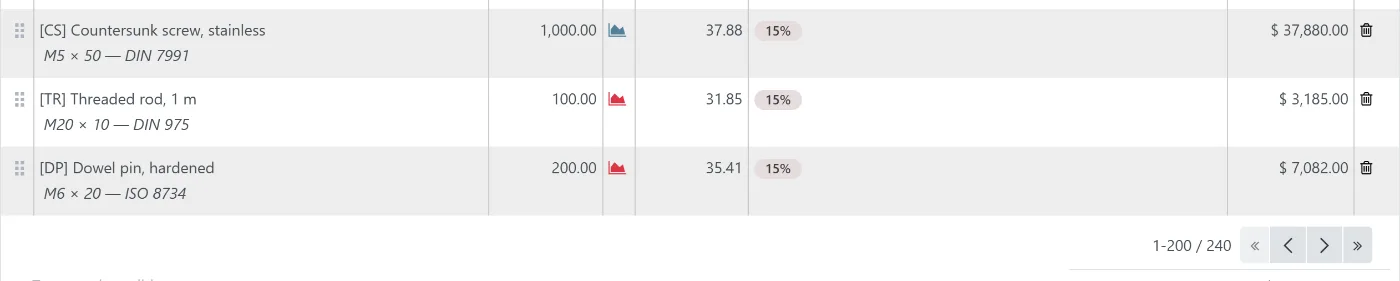
Same rows, same page size. A second pager where your eye already is, with first and last. The add controls are absent because this is not the last page — the line would not land here.
And the same thing photographed, because a reconstruction is only as good as your willingness to believe it. Two Odoo 18 servers on one machine, the same 240-line order seeded into both, the same 1440 × 900 window, and the crop taken from the same point in the page on each side — the last three rows and whatever sits under them. The page size is 200 on both, so nothing in the pair is doing the argument's work except the interface. The company, the customer and every part number are invented.
Column rules instead of row rules Tidy Rows & Columns
Stock Odoo draws a horizontal line under every row. On a wide list this is exactly backwards: the eye needs help travelling across a row, not distinguishing one row from the next. So we remove the row dividers, add clearly visible vertical separators between columns, and lay a distinctly different background under alternate rows.
The banding is deliberately strong rather than decorative. A whisper of a stripe loses the argument: once the row rules are gone, the band is the only thing holding a wide row together, so it has to be visible without being read as a rule. Selected rows and the row being edited are excluded so Odoo's own highlighting still reads, and hover is defined after the stripe at matching specificity so it wins on source order rather than on an escalation of !important.
A pager where your eye already is Pager & Add a line
On an embedded order-line list, Odoo puts the pager above the table — and on a sales order it fills that page with two hundred lines, because limit="200" is written into the form view core ships. You read to the bottom of two hundred rows and then scroll all the way back up to move on. We repeat the pager underneath, and add the first and last buttons core omits.
“Add a line” that adds it where you are looking Pager & Add a line
This is the one that costs real time. On a paginated x2many list, stock Odoo shows “Add a line” on every page — but the new line goes to the end of the record set, on the last page. Add a line from page 1 and it appears somewhere you are not.
So we show “Add a line” on the last page only. That creates one further problem, and the fix for it is the detail we are proudest of: when the last page is exactly full — 400 lines at 200 per page — there is no page with room on it. We therefore report one extra slot to the pager, producing a navigable blank last page that exists solely so there is somewhere to add a line. It is a virtual page; nothing is written until you type.
And the page you were on survives a reload Pager & Add a line
Closing a dialog on a form triggers a reload, which replaces the embedded list with a fresh one at offset zero. You were on page 4; you are now on page 1. We remember the offset and restore it. This is a two-line irritation that costs a purchasing clerk several minutes a day and that nobody ever reports as a bug, because it does not look like one.
Per-page limits, per model, per field Page limits
Odoo hard-codes the per-page limit of an embedded list in the form's view definition. Changing it for sales orders means editing a view; changing it for purchase orders means editing another; changing your mind means a developer.
We turn that into configuration: a rule is a model, a field and a limit, editable in Settings, applied by patching the form arch at runtime. Sales orders can show 200 lines while purchase orders show 40, decided by the people who read them rather than by whoever wrote the view. It is not a sales feature — the same rule works on invoice lines or on the moves inside a stock transfer.
Paging then creates a second problem, which is reordering. Once lines span pages, dragging a line from page 3 to page 1 is not possible — you cannot drag to somewhere that is not rendered. So a double-click on the drag handle opens a “send to page” dialog: pick the target page, pick top or bottom, done. If the record has unsaved changes it refuses and says why, because the write triggers a reload that would discard them.
Edge cases, found and kept fixed
The difference between an implementer and an operator is what happens on the day something behaves strangely for one customer. Two from the last year:
- A twenty-two-second checkout page. One customer with roughly nine hundred saved delivery addresses. Core Odoo's checkout template asks, once per address card, whether that address is editable — and each answer re-runs a recursive search over the entire partner tree. Thousands of queries, one page.
- A checkout the customer could not escape. If a cart's billing address pointed at a delivery-only contact, the page redirected to the billing form forever, and that form offered no way to choose a different existing address or to turn off “same as delivery”. We added the picker that ends the loop.
Every one of those was found on a tenant, fixed as a module, and is now installed on every tenant that could hit it. That is the actual product: a defect found once, fixed for everyone.
AI that does not bill per token
Two things make our Odoo AI work different, and one of them is commercial rather than technical.
It runs on a subscription you already have. Most Odoo AI integrations require API keys and bill per token, which makes the running cost unpredictable and quietly discourages the exploratory use that makes an assistant worth having. Ours can drive an existing Claude Code or Codex subscription instead, so asking the system nine questions costs the same as asking it one.
Every write it makes is prepared for a person to release. The assistant reaches Odoo through named, typed business intents. It prepares drafts, stages imports and answers questions about your margins — and the moment a step would commit something, it hands over: posting, sending and confirming are done by your team in Odoo's own interface. What that removes is the mechanical work; what it keeps with your people is the decision. You get the source, so your own auditor can confirm that boundary in an afternoon rather than taking our word for it. The full argument is here.
What managed does not buy you
Three things, said plainly, because a list of benefits with no cost attached is marketing.
- It does not remove the need for you to decide things. The longest phase of every implementation is not configuration, it is a client deciding what their own process actually is. We can facilitate that. We cannot do it for you, and a partner who claims otherwise is planning to decide it for you badly.
- It does not make customisation free. Operating covers the modules we ship, upgrades, monitoring, backups and a queue of small interface work each month. A new integration or a substantial custom feature is a project and is quoted as one.
- It does not make Odoo into something else. Odoo has genuine limitations, and the honest answer to some requirements is a different tool or a piece of custom software beside it. We build those too — but we will tell you which side of the line you are on before you pay for the wrong one.
The zynAIR page covers what Odoo is, what it costs, and how an implementation runs.
Questions
No. zynAIR is Odoo 18 Community Edition, configured and operated by ZYNTEIRO. Everything we add is an Odoo module — an extension loaded alongside core, using Odoo's own patch and asset-bundle mechanisms. Nothing in core is edited. That is not a philosophical position; it is the only posture under which a version upgrade is a scheduled task rather than a project.
They are ported, and that work is ours rather than yours — it is what the monthly fee is for. Modules are written to be portable: OWL patches over specific extension points, asset-bundle entries instead of theme forks, and any module that patches something genuinely fragile is kept separate, so that if an upgrade does break it there is exactly one thing to uninstall and stock behaviour is back.
Yes, and you should confirm that before signing with anyone. It is Odoo Community with standard modules on top; there is no proprietary datastore and no encrypted layer. You get the database and the addons. The modules we license per-tenant come with terms stated in writing before you sign, not discovered at the exit.
We operate Community. For most small and mid-sized Malaysian operations the Enterprise features that justify the per-user fee are either replaceable by community modules or genuinely unused — and the per-user licence turns every new warehouse hand into a recurring cost, which quietly discourages putting people on the system at all. Where Enterprise is genuinely the right answer, we will say so.