
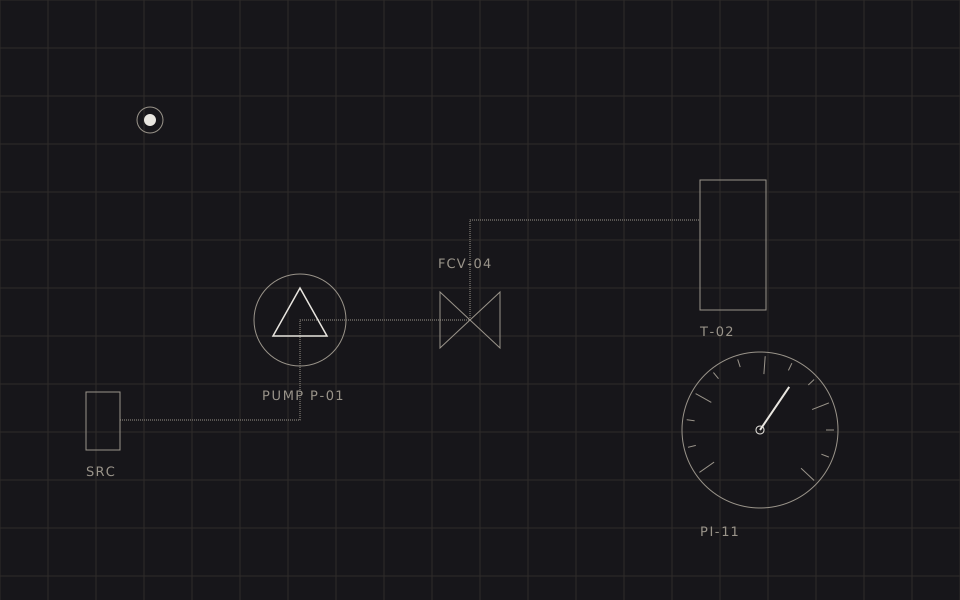
The demo
Change the state. Drag the demand slider. The gauge, the impeller, the valve gate, the vessel level and the status lamp are five outputs of one small machine — none of them is a keyframe.
There is no client for this piece. It exists because we were asked often enough what we would do instead of Rive, and a demo is a better answer than a paragraph.
Why not just use Rive
Rive is good software and the state-machine model it popularised is genuinely the right abstraction for interactive vector work. This is not an argument against it.
It is an argument about where the cost lands. A Rive graphic on a marketing page brings four things with it: a runtime that is 2.43 MB raw and about 831 kB gzipped (@rive-app/canvas 2.39.0, measured 22 July 2026), a binary .riv asset your engineers cannot diff or edit, an editor licence and an export step in the release process, and a hard dependency on a vendor for a piece of your front page.
For a piece with dozens of animated properties and designer-authored timelines, that trade is obviously worth it. For a hero graphic with four states and three moving parts, you are paying a platform tax for a lookup table.
The middle path is the one nobody offers because there is no product in it: keep the state-machine idea, drop the runtime.
The state machine is six lines
Every state names a target for each animated channel and a time constant. That is the whole declaration in the demo above, apart from each state's display label:
var STATES = {
  idle:  { flow: 0.00, valve: 0.02, lamp: 'muted',   tau: 420 },
  prime: { flow: 0.28, valve: 0.45, lamp: 'warning', tau: 260 },
  run:   { flow: 1.00, valve: 1.00, lamp: 'success', tau: 340 },
  fault: { flow: 0.00, valve: 0.00, lamp: 'danger',  tau: 140 }
};
Note what is not there: transitions. There is no idle→run animation, no run→fault animation, no matrix of n² transitions to author and maintain. A state change moves the targets; the mixer resolves the difference from wherever the channels currently happen to be.
That is the property that makes this scale. Adding a fifth state costs one line and zero transitions. Interrupting a transition halfway is not a special case, because there is no transition to interrupt — there is only a current value and a target.
The mixer, and why it cannot overshoot
One line does the animation:
v += (target - v) * (1 - Math.exp(-dt / tau));This is exponential approach — a first-order lag, the same equation that describes an RC circuit charging. Three properties earn it its place:
- It is frame-rate independent.
dtis real elapsed time, so the animation runs identically at 60 Hz and at 120 Hz. Per-frame lerps (v += (t - v) * 0.1) do not have this property and are the most common bug in hand-rolled animation. - It cannot overshoot. The value approaches the target monotonically and never passes it. Our design system forbids bounce, spring and overshoot outright; with this mixer that rule is enforced by arithmetic rather than by review.
- It is interruptible for free. Change the target mid-flight and the motion continues smoothly from wherever it is. No re-timing, no cancel-and-restart, no visible seam.
A spring solver would give you the same interruptibility and cost about the same. We do not use one because a spring's defining feature is overshoot, and overshoot is exactly what an instrument must not do.
Generating the vectors instead of drawing them
The second half of the trick is that the artwork is not an asset. The gauge in the demo has eleven tick marks — major every fifth — generated in a loop:
var A0 = -220, SWEEP = 260;   // gauge arc, degrees
for (var i = 0; i <= 10; i++) {
  var a = (A0 + i * SWEEP / 10) * Math.PI / 180;
  var r0 = GR - (i % 5 === 0 ? 9 : 5);
  line(GX + cos(a) * r0, GY + sin(a) * r0,
       GX + cos(a) * (GR - 2), GY + sin(a) * (GR - 2));
}
The needle reads the same constant, so changing a 260° sweep to a 300° sweep is one number. In an editor-authored asset it is a redraw, a re-export and a deploy.
It also means the graphic inherits the page. Every stroke uses a design-system token, so the instrument re-themes with the site — light, dark, whatever comes next — with no second asset. Try the theme toggle in the header while watching the demo. A .riv or .json file cannot do that; its colours were baked at export.
When to use this, and when to use Rive anyway
Use the hand-written machine when:
- The graphic has fewer than roughly a dozen animated properties.
- The motion is mechanical — instruments, diagrams, schematics, status, data-driven illustration.
- The artwork must follow the site's theme tokens rather than carry its own palette.
- Engineers, not designers, will maintain it — and it must survive a Git diff.
Use Rive when:
- A designer owns the motion and needs to iterate without an engineer in the loop.
- There is character animation, skeletal rigging, or blending between many timelines.
- The same asset ships to web, iOS, Android and Flutter and must look identical in all four.
The failure mode we see most is a team reaching for the second list's tooling to solve a first-list problem, then carrying the runtime forever. Whichever way you go, decide it on the shape of the motion, not on the shape of the demo reel.
Questions
No — it is a replacement for a specific use of them. If a designer needs to author character animation, blend trees and complex timelines in a visual editor, Rive is the right tool and its runtime is worth its weight. If an engineer needs a diagram, an instrument, a status graphic or a hero animation that reacts to a handful of inputs, hand-writing the state machine costs a day and removes the runtime, the editor licence and the export step from the project forever.
Measured on 22 July 2026 from unpkg: @rive-app/canvas 2.39.0 is a 444 kB JS wrapper plus a 1.99 MB WASM binary — 2.43 MB raw, about 831 kB gzipped — before your .riv file. The canvas-lite build, which drops text, layouts, audio and scripting, is 1.28 MB raw and about 408 kB gzipped. lottie-web 5.13.0 is 306 kB minified (76 kB gzipped) for the full player, or 168 kB minified (47 kB gzipped) for the light build, before your JSON. Those are entirely reasonable numbers for what they do. They are not reasonable as the price of a hero graphic with four states, which is the case this technique addresses.
Yes, and properly. The design system collapses every duration token to 1 ms under reduced motion, so the instrument does the same: state changes snap to their target instead of easing, the marching flow dashes stop entirely, and the vessel level tracks the flow directly instead of filling over time. The control is still fully operable — reduced motion removes the movement, not the function.